Neural Networks from Zero
The ideas you need before you build your first model in Chartorch
Dr. Babafemi Sorinolu
Plan for today
What you will be able to do by the end
- Explain what a neuron computes and why we stack them into layers.
- Describe how a network learns: loss → gradient → update.
- Pick a sensible loss function for regression vs. classification.
- Track the shape of data as it flows through a network.
- Explain what convolution and pooling layers do to an image.
- Read and modify the PyTorch code that Chartorch generates.
Roadmap
| Part | Topic | Chartorch connection |
|---|---|---|
| 1 | What is machine learning? | The Data tab |
| 2 | The neuron and the layer | Linear block |
| 3 | Non-linearity | ReLU, Sigmoid, Tanh |
| 4 | Learning: loss and gradient descent | The Training tab |
Roadmap
| Part | Topic | Chartorch connection |
|---|---|---|
| 5 | Shapes and tensors | Connecting blocks |
| 6 | Images: convolution and pooling | Conv2d, MaxPool2d, Flatten |
| 7 | Keeping training healthy | Dropout, BatchNorm2d, LayerNorm |
Part 1 · What is machine learning?
Programming vs. learning
Traditional programming
You write the rules.
if x[1] > 0:
    return "blue"
else:
    return "red"
Machine learning
You give examples and the computer finds the rule.
(-1.0, 2.0) → blue
( 1.0,-3.0) → red
( 4.0, 1.0) → blue
   ...
A model is a function with adjustable numbers inside it. Training = finding good values for those numbers.
Three words you will hear constantly
- Input (features,
x): what the model sees. A point(x₁, x₂), or a 30×30 image. - Label (target,
y): the right answer we want the model to produce. - Dataset: many
(input, label)pairs.
In Chartorch, the Data tab shows you exactly these:
input  = [-1.0, 2.0]
label  = 0.0
size   = 24          ← number of examples
input_shape = [2]    ← each input is 2 numbers
num_labels  = 2      ← two classes
Two kinds of problems
Regression — predict a number
- house price, temperature
- Chartorch:
LinearRegression1,QuadraticRegression,WaveRegression
Classification — predict a category
- spam / not spam, which letter
- Chartorch:
Classifier1–4,Iris,Letters,MNIST
Quick check
Predicting tomorrow’s high temperature in Albany: regression or classification? Predicting “will it snow tomorrow, yes or no”?
Part 2 · The neuron
One neuron = weighted sum + bias
\[ z = w_1 x_1 + w_2 x_2 + \dots + w_n x_n + b \]
- \(x_i\) — inputs
- \(w_i\) — weights: how much each input matters
- \(b\) — bias: shifts the output up or down
Worked example. \(x = (-1, 2)\), \(w = (0.5, 1.0)\), \(b = -0.5\)
\[ z = 0.5(-1) + 1.0(2) - 0.5 = 1.0 \]
What one neuron “sees” in 2-D
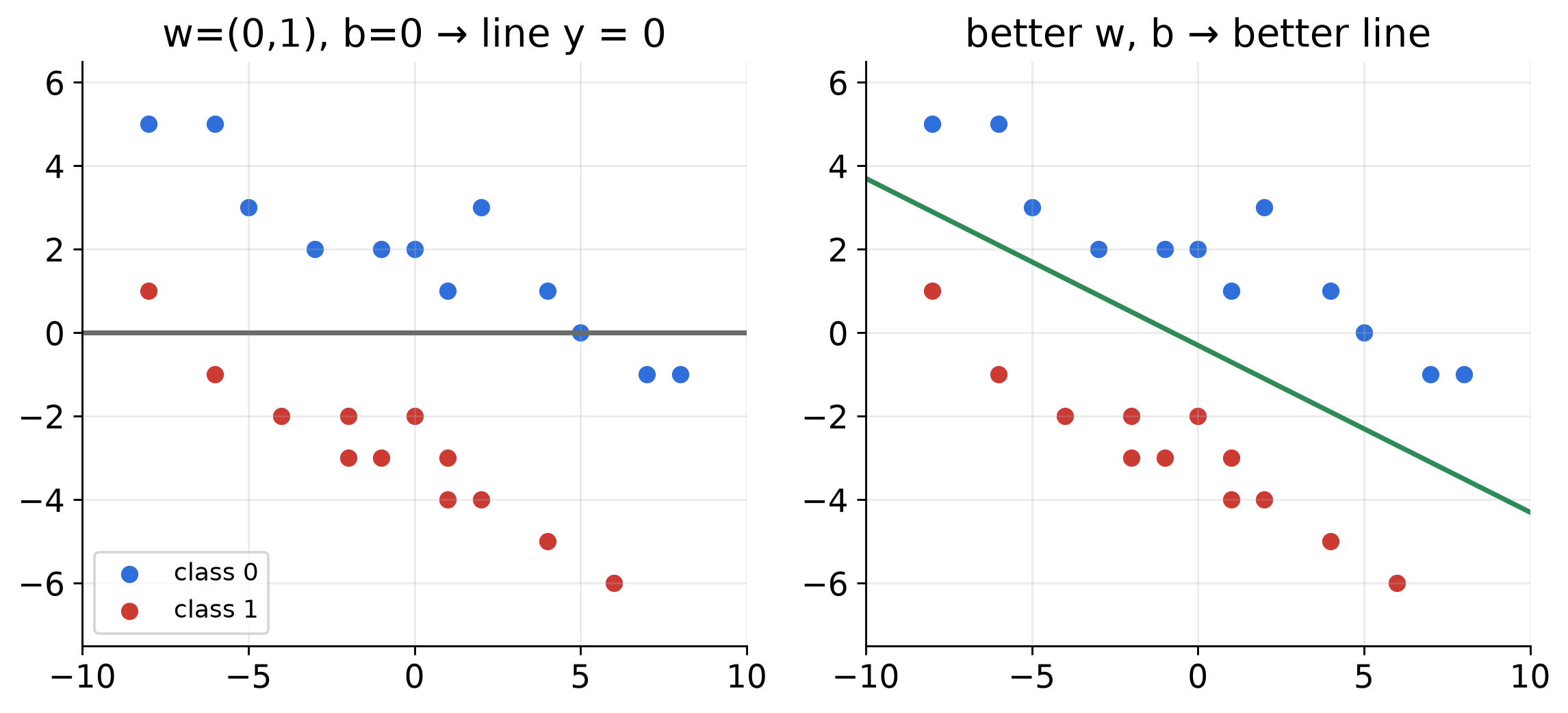
The set of points where \(z = 0\) is a straight line. One neuron can only draw one straight boundary.
In PyTorch: nn.Linear
A layer is many neurons that all look at the same inputs.
in_features = 2→ each neuron reads 2 numbersout_features = 8→ there are 8 neurons, so 8 outputs- Parameters: \(2 \times 8\) weights \(+ 8\) biases \(= 24\) numbers to learn
Rule you will use all semester
in_features must equal the size of whatever comes into the layer.
Stacking layers
flowchart LR
  X["input<br/>2 numbers"] --> L1["Linear(2, 8)"]
  L1 --> A1["ReLU"]
  A1 --> L2["Linear(8, 8)"]
  L2 --> A2["ReLU"]
  A2 --> L3["Linear(8, 1)"]
  L3 --> Y["output<br/>1 number"]
- The last layer’s
out_featuresis decided by the problem, not by you. - The middle (“hidden”) sizes are your design choice.
Quick check
How many learnable numbers are in Linear(8, 8)?
Part 3 · Non-linearity
Why stacking Linear layers alone is not enough
\[\begin{aligned}
\text{Linear}_2(\text{Linear}_1(x))
&= W_2(W_1x + b_1) + b_2 \\
&= \underbrace{(W_2W_1)}_{W}x
+ \underbrace{(W_2b_1 + b_2)}_{b}
\end{aligned}\]
Two linear layers collapse into one linear layer. Still just a straight line.
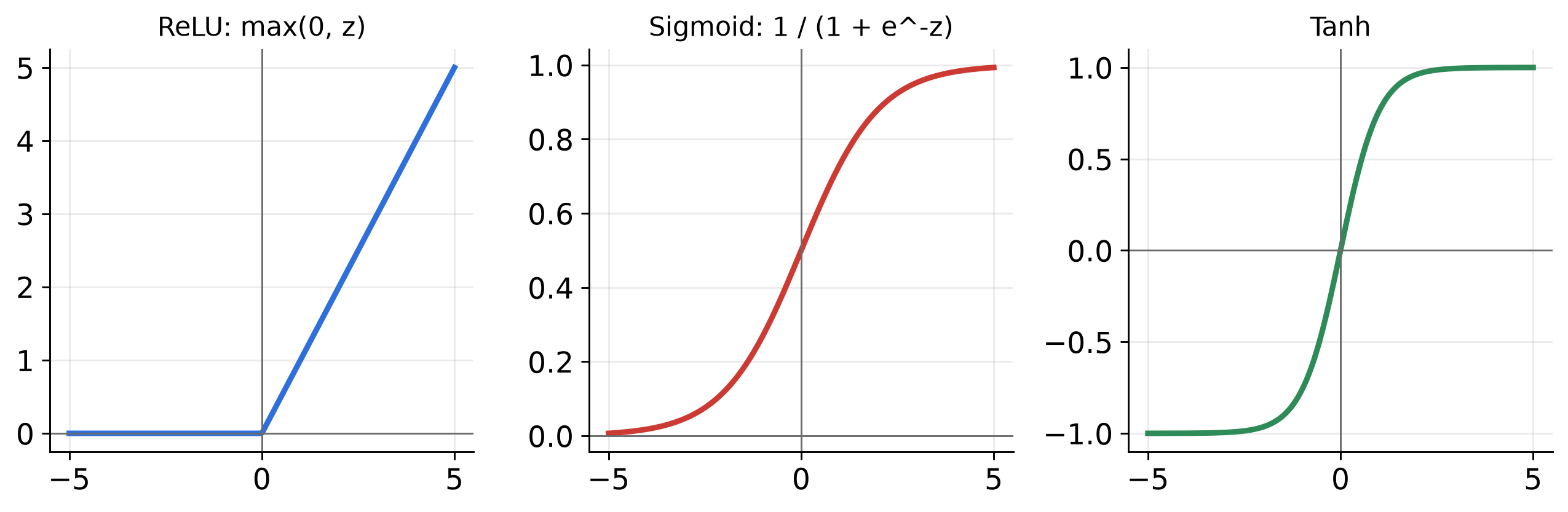
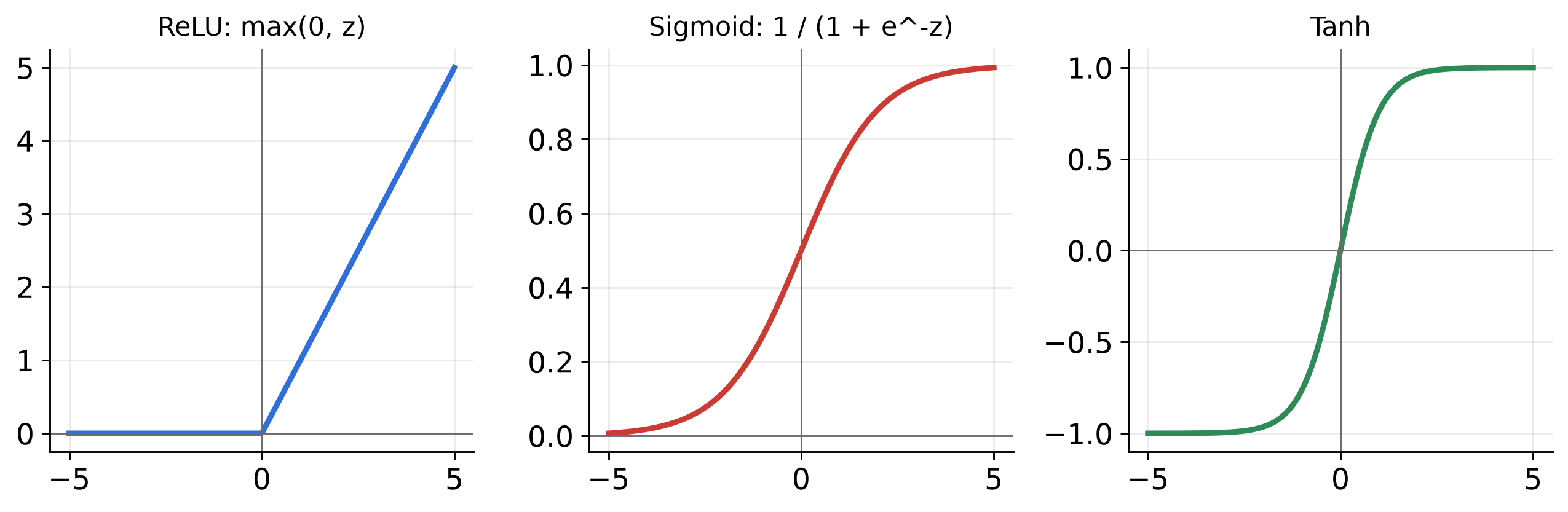
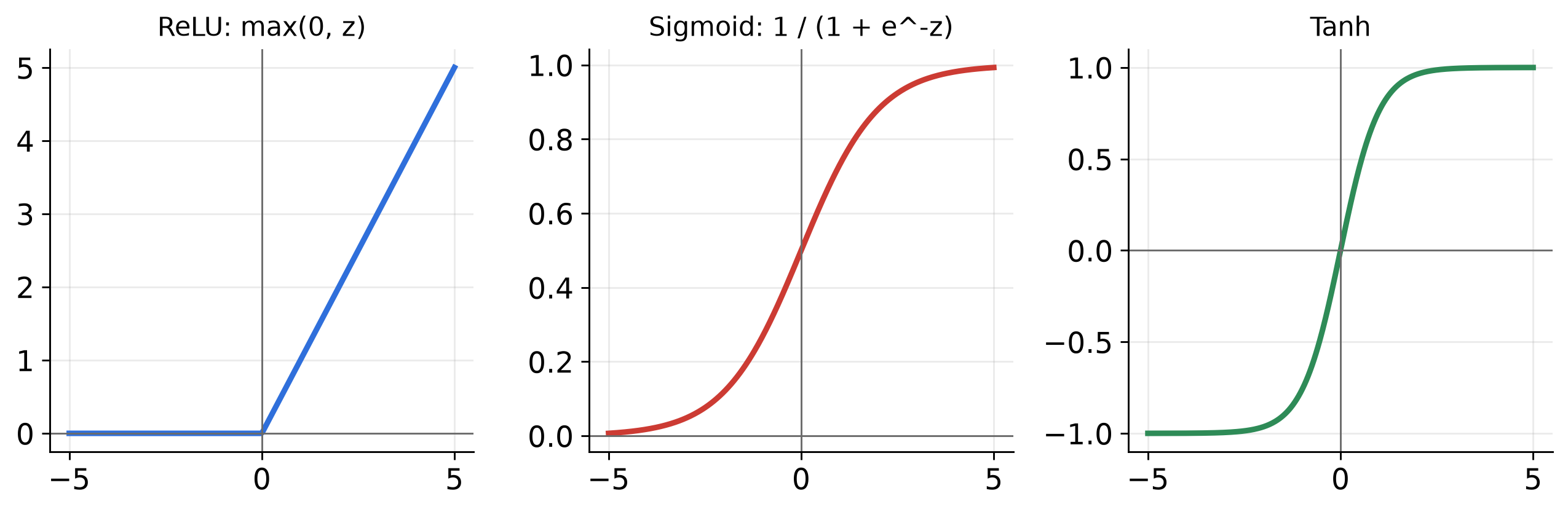
Fix: put a bendy function between them: an activation function.
Activation functions
| Output range | Typical use | |
|---|---|---|
ReLU |
\([0, \infty)\) | Default for hidden layers |
Activation functions
| Output range | Typical use | |
|---|---|---|
Sigmoid |
\((0, 1)\) | A probability for yes/no |
Activation functions
| Output range | Typical use | |
|---|---|---|
Tanh |
\((-1, 1)\) | Hidden layers, centered at 0 |
What non-linearity buys you
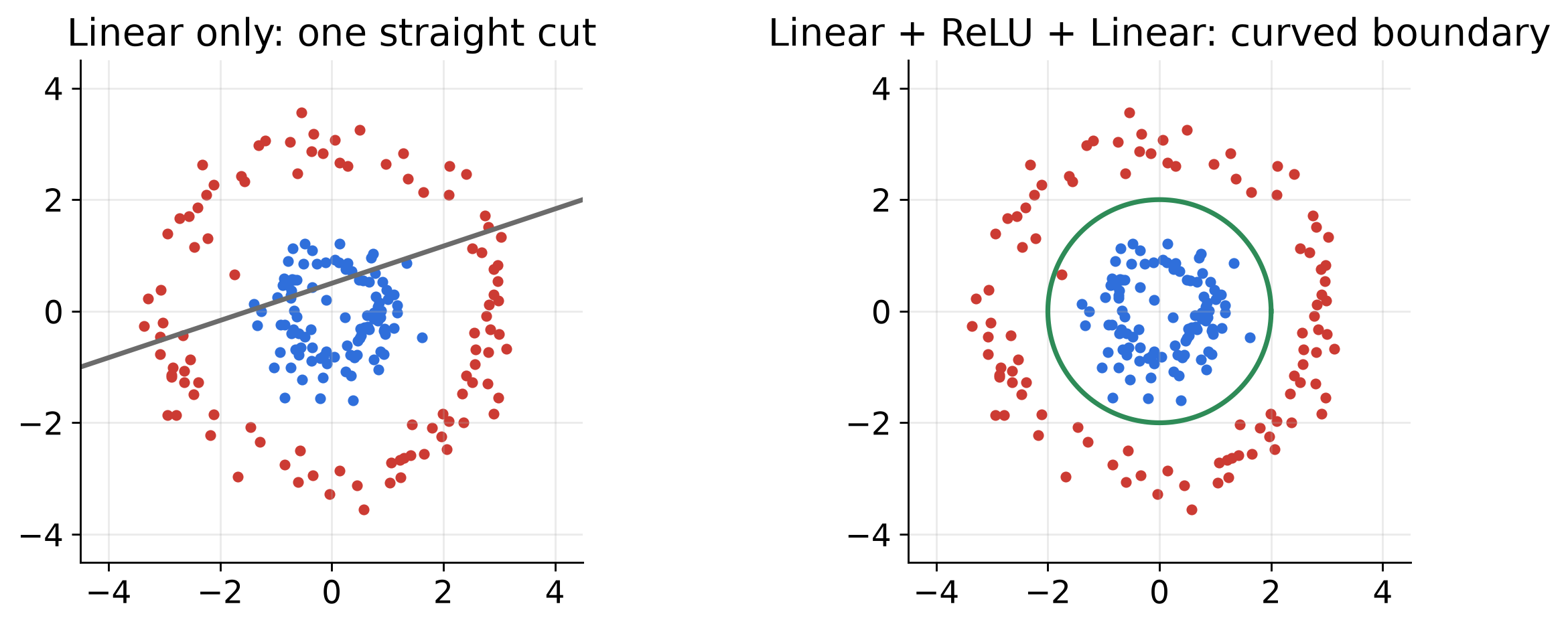
With activations in between, a network can approximate (almost) any shape of boundary, given enough neurons.
Part 4 · How a network learns
The learning loop
flowchart LR
  A["1. Forward pass<br/>model(x) → prediction"] --> B["2. Loss<br/>how wrong is it?"]
  B --> C["3. Backward pass<br/>gradient of loss<br/>w.r.t. every weight"]
  C --> D["4. Update<br/>nudge each weight<br/>downhill"]
  D --> A
One trip around the loop for one batch = one step. One pass over the whole dataset = one epoch.
Step 2: the loss function
A single number that says how wrong the predictions are. Lower is better.
Mean Squared Error (regression):
\[ \text{MSE} = \frac{1}{N}\sum_{i=1}^{N} (\hat{y}_i - y_i)^2 \]
Worked example. Predictions \(\hat y = (2.5, 0.0)\), truth \(y = (2.0, 1.0)\)
\[ \text{MSE} = \tfrac{1}{2}\big[(0.5)^2 + (-1)^2\big] = \tfrac{1}{2}(0.25 + 1) = 0.625 \]
Loss for classification: cross-entropy
The network outputs one score (“logit”) per class. Softmax turns scores into probabilities:
\[ p_k = \frac{e^{z_k}}{\sum_j e^{z_j}} \qquad \text{CE} = -\log p_{\text{correct class}} \]
- Confident and right → \(p \approx 1\) → loss \(\approx 0\)
- Confident and wrong → \(p \approx 0\) → loss is huge
Loss for classification: cross-entropy
| Problem | Last layer | Loss in Chartorch |
|---|---|---|
| Regression | Linear(…, 1) |
MSE (or L1, Huber) |
| Yes/no (2 classes) | Linear(…, 1) |
BCEWithLogits |
| K classes | Linear(…, K) |
CrossEntropy |
Warning
Don’t put Sigmoid before BCEWithLogits, or a softmax before CrossEntropy. Those losses already include it.
Step 3–4: gradient descent
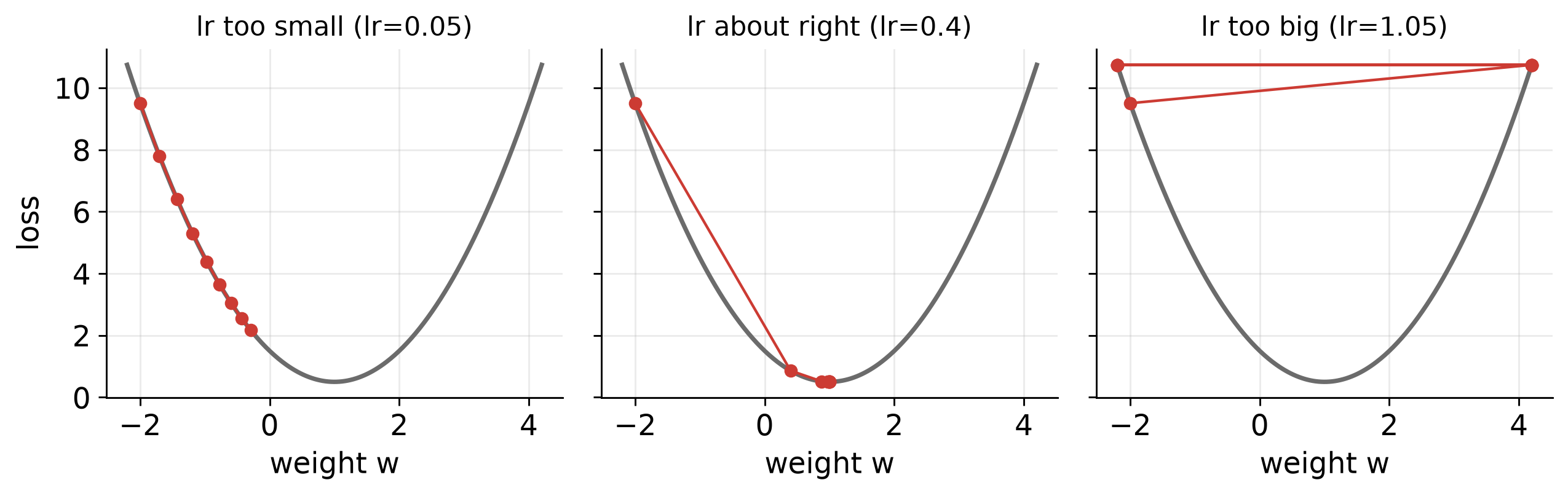
Imagine the loss as a landscape. The gradient points uphill. Step the other way.
\[ w \leftarrow w - \eta \cdot \frac{\partial \text{Loss}}{\partial w} \]
\(\eta\) is the learning rate (lr in Chartorch).
Step 3–4: gradient descent
Backpropagation in one sentence
Using the chain rule, PyTorch works out how much each weight contributed to the error, all the way from the output back to the first layer.
You never write this yourself. In the generated code it is one line:
Optimizers in Chartorch
| Optimizer | Idea | Starting lr |
|---|---|---|
SGD |
Plain gradient descent; add momentum=0.9 to roll through bumps |
0.01–0.1 |
Adam |
Adapts the step size per weight; forgiving | 0.001–0.01 |
AdamW |
Adam + cleaner weight decay | 0.001 |
Practical default
Start with Adam, lr = 0.01 on the small datasets. If the loss curve jumps around, lower lr. If it barely moves, raise it.
Batches and epochs
- Batch size: how many examples per update.
1= noisy but cheap;32= smoother. - Epoch: one full pass over the dataset.
- Shuffle: mix the order each epoch so the model doesn’t learn the order.
Quick check
A dataset has 3,120 images (Letters). With batch_size = 32, how many weight updates happen in one epoch?
Reading a loss curve
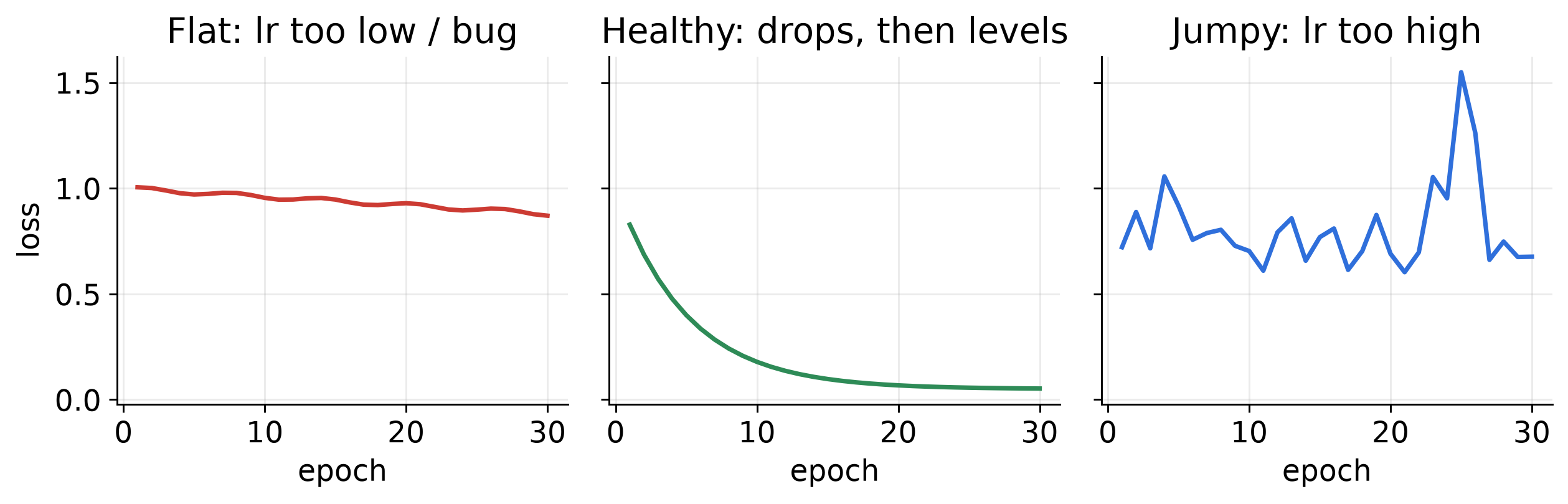
Chartorch draws this curve live in the Train tab.
Part 5 · Shapes
A tensor is a box of numbers with a shape
| Thing | Shape |
|---|---|
| One 2-D point | [2] |
| A batch of 16 points | [16, 2] |
| One grayscale 30×30 image | [1, 30, 30] (channels, height, width) |
| A batch of 16 images | [16, 1, 30, 30] |
The first dimension is almost always the batch.
Shapes flow through the network
flowchart LR
  X["[16, 2]"] -->|"Linear(2, 8)"| A["[16, 8]"]
  A -->|"ReLU"| B["[16, 8]"]
  B -->|"Linear(8, 1)"| Y["[16, 1]"]
Linear(in, out)changes the last dimension fromintoout.- Activations (
ReLU, …) never change the shape.
The #1 error you will see
RuntimeError: mat1 and mat2 shapes cannot be multiplied (16x2 and 64x64)
Translation: the layer expected 64 inputs but received 2. Fix in_features.
Practice: fill in the shapes
Dataset: Iris (4 features, 3 classes), batch size 10
input            → [10, 4]
Linear(4, 16)    → [10, ?]
ReLU             → [10, ?]
Linear(?, 3)     → [10, ?]
Answers: 16, 16, 16, 3. Loss: CrossEntropy.
Part 6 · Images
Option A: flatten the image
flowchart LR
  X["[N, 1, 30, 30]"] -->|"Flatten"| F["[N, 900]"]
  F -->|"Linear(900, 128)"| H["[N, 128]"]
  H -->|"ReLU"| R["[N, 128]"]
  R -->|"Linear(128, 26)"| Y["[N, 26]"]
Works, but the model forgets which pixels were next to each other.
Option B: convolution
A small filter (e.g. 3×3 weights) slides across the image and computes a weighted sum at each position.
\[ \begin{bmatrix} -1 & 0 & 1 \\ -1 & 0 & 1 \\ -1 & 0 & 1 \end{bmatrix} \quad\text{lights up at vertical edges} \]
- The same 9 weights are reused everywhere → far fewer parameters.
out_channels = 16→ learn 16 different filters → 16 “feature maps”.
Conv2d output size
\[ H_\text{out} = \left\lfloor \frac{H + 2p - k}{s} \right\rfloor + 1 \]
(\(k\) = kernel size, \(p\) = padding, \(s\) = stride; dilation = 1)
| Layer | Input | Output |
|---|---|---|
Conv2d(1, 8, k=3, p=0) |
[N, 1, 28, 28] |
[N, 8, 26, 26] |
Conv2d(1, 8, k=3, p=1) |
[N, 1, 28, 28] |
[N, 8, 28, 28] |
MaxPool2d(2) |
[N, 8, 28, 28] |
[N, 8, 14, 14] |
Flatten |
[N, 8, 14, 14] |
[N, 1568] |
Important
in_channels = number of channels coming in. Grayscale = 1, colour = 3. Chartorch’s default is 3.
Pooling
MaxPool2d(kernel_size=2) keeps the largest value in every 2×2 square.
\[ \begin{bmatrix} 1 & 3 & 2 & 0 \\ 5 & 4 & 1 & 1 \\ 0 & 2 & 6 & 7 \\ 1 & 1 & 8 & 2 \end{bmatrix} \;\xrightarrow{\;\text{max pool } 2\times2\;}\; \begin{bmatrix} 5 & 2 \\ 2 & 8 \end{bmatrix} \]
- Halves height and width.
- Has no learnable parameters.
A classic small CNN
flowchart LR
  X["[N,1,28,28]"] -->|"Conv2d(1,8,3,p=1)"| C["[N,8,28,28]"]
  C -->|"ReLU"| R["[N,8,28,28]"]
  R -->|"MaxPool2d(2)"| P["[N,8,14,14]"]
  P -->|"Flatten"| F["[N,1568]"]
  F -->|"Linear(1568,10)"| Y["[N,10]"]
Pattern to remember: Conv → ReLU → Pool, repeat, then Flatten → Linear.
Part 7 · Keeping training healthy
Underfitting vs. overfitting
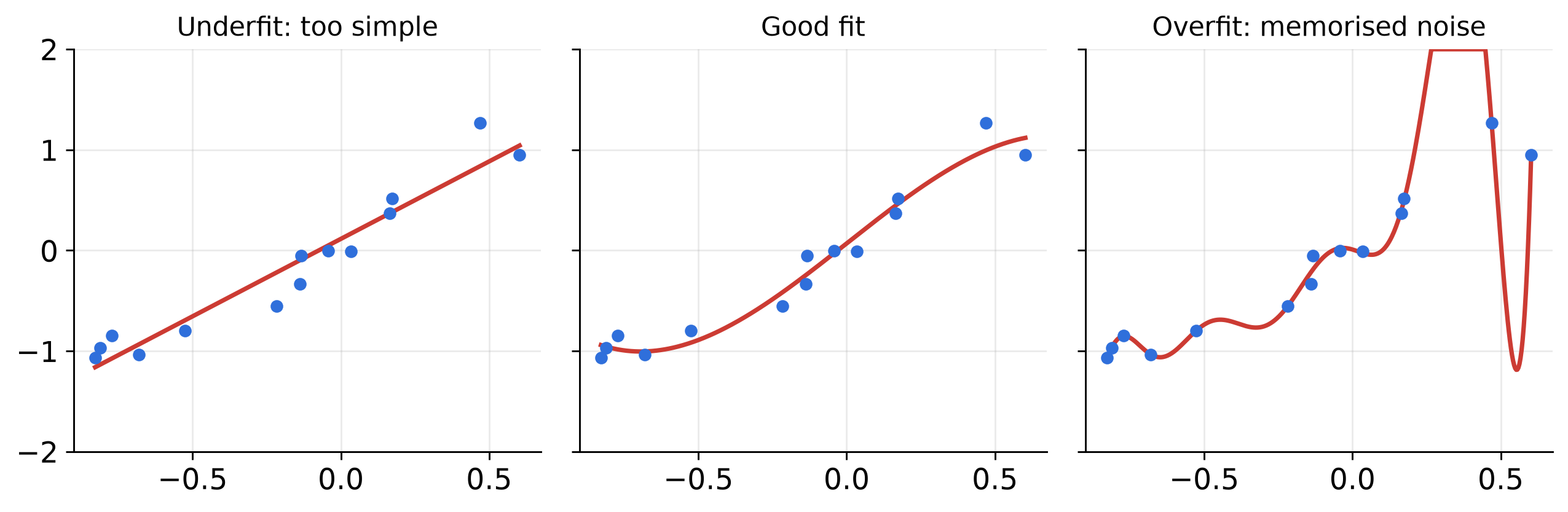
- A model that is perfect on training data may be memorising, not learning.
- The honest test: data the model has never seen.
Regularisation and normalisation layers
| Block | What it does | When |
|---|---|---|
Dropout(p=0.5) |
Randomly zeroes neurons during training | Model overfits |
BatchNorm2d(C) |
Re-centres each conv channel across the batch | Between Conv and ReLU |
LayerNorm(n) |
Re-centres features within each example | After Linear |
Warning
BatchNorm2d(num_features) must match the number of channels; LayerNorm(normalized_shape) must match the feature size. Same “sizes must agree” rule as before.
From diagram to code
What Chartorch generates
model = nn.Sequential(
    nn.Linear(in_features=2, out_features=8, bias=True),
    nn.ReLU(inplace=False),
    nn.Linear(in_features=8, out_features=1, bias=True),
)

criterion = nn.BCEWithLogitsLoss()
optimizer = torch.optim.Adam(model.parameters(), lr=0.01)

for epoch in range(epochs):
    for inputs, targets in dataloader:
        optimizer.zero_grad()           # clear old gradients
        outputs = model(inputs)         # 1. forward
        loss = criterion(outputs, targets)  # 2. loss
        loss.backward()                 # 3. backward
        optimizer.step()                # 4. update
Every box you drew is one line in nn.Sequential. The loop is the four-step learning loop.
Using Chartorch
- Data tab → choose a dataset; note
input_shape,label_shape,num_labels. - Click a layer button, then click the canvas to place it. Click a block to edit its values.
- Connect mode → click one block, then the next. Build one chain, no branches.
- Training tab → choose optimizer, loss, epochs, batch size.
- Generate → read the code → Train → watch the loss → Test.
Tip
If Generate says “the network architecture is invalid”, check that every block is connected in a single line from first to last.
Lab 1 · Three warm-ups
| # | Dataset | Build | Settings |
|---|---|---|---|
| 1 | LinearRegression1 |
Linear(1, 1) |
MSE · SGD lr 0.01 · 100 epochs |
| 2 | Classifier1 |
Linear(2,8) → ReLU → Linear(8,1) |
BCEWithLogits · Adam lr 0.01 · 50 epochs |
| 3 | Letters |
Flatten → Linear(900,128) → ReLU → Linear(128,26) |
CrossEntropy · Adam lr 0.001 · 5 epochs |
For each: predict the final loss shape before you press Train, then explain any surprise in one sentence.
Lab 2 · Break it on purpose
- In #2, delete the
ReLU. What happens to the test plot’s boundary? Why? - Set
lr = 5. Describe the loss curve. - Change the first layer to
Linear(64, 8). Read the error. Which number is wrong? - Swap
BCEWithLogitsforMSE. Does it still learn? Is it the right choice?
Lab 3 · Your first CNN (MNIST)
Build: Conv2d(1, 8, 3, padding=1) → ReLU → MaxPool2d(2) → Flatten → Linear(?, 10)
- Work out
?on paper before you build it. - Then add a second
Conv → ReLU → Poolstage. What is the new?
Answers: 8 × 14 × 14 = 1568; with a second Conv2d(8, 16, 3, padding=1) + pool: 16 × 7 × 7 = 784.
Summary
- A neuron = weighted sum + bias. A layer = many neurons.
- Activations let networks draw curved boundaries.
- Training = forward → loss → backward → update, repeated.
- Choose the loss from the problem type.
- Shapes must agree between connected layers.
- Conv + Pool exploit the 2-D structure of images.
Exit ticket (2 minutes)
- One thing that clicked today.
- One thing that is still fuzzy.
- A network’s loss stays flat at 0.69 for 20 epochs. Name two things you would try.
Neural Networks from Zero · Chartorch